Exponent energy · Shipped 2024
Timeline
Jan - Mar 2024 (Shipped)
Skills
Systems Design User Research Frontend Dev Prototyping
Role & Team
Product Designer & UI Engineer, worked with 2 Backend Engineers
Responsibility
Led end-to-end design from user research with fleet managers to high-fidelity UI. Owned the frontend implementation using AI-assisted workflows to ensure design-to-code parity.
Company
Exponent is India’s fastest EV‑charging startup, building a full‑stack battery and charging platform that can charge EVs from 0–100% in 15 minutes. It builds both the battery pack and the charging infrastructure as a coordinated stack, allowing real‑time control of cell conditions.
Overview
Problem
Exponent Energy builds 15-minute rapid-charging batteries for commercial EV fleets. While the technology was groundbreaking, the management experience was broken. Fleet managers were forced to use IntelliCar, a third-party IoT dashboard designed for engineers, not operators.
Solution
I designed and built Exponent Fleet OS—a unified command center that translates raw battery telemetry into actionable operational insights.
The Problem
Fleet managers operate on thin margins. They need to know if a vehicle is idle or running. IntelliCar failed them in three ways:

Data Paralysis
It showed "Cell Voltage" and "Amps" engineering data that isn't a priority for logistics.
The "PPT" Workaround
Our team had to manually scrape data and send weekly PowerPoint reports just to prove the vehicles were performing.
Broken Navigation
Finding a vehicle required 7+ clicks through a complex tree structure.
Old Intellicar interface the Fleet Managers used!
The SOlution
"What is the pulse of my fleet right now?"
The Home screen needed to be an instant status check. I moved away from generic map pins to a status-driven visualization.
Vehicle Status
I implemented a color-coded legend directly on the map.
Green (Running): The vehicle is active and earning.
Blue (Standby): The vehicle is idle.
Orange (Charging): Critical for Exponent users to verify charging behavior.
Smart Filtering & Context
I avoided clutter by using progressive disclosure in the controls:
The "Inactive" Filter: A top-level tab specifically for "Inactive (>2 days)". This was a critical request to help managers find "lost" or broken vehicles immediately.
City & Time Context: Dropdowns for City (Bangalore, Pune, Delhi) and Timeframe (Today vs. This Month) update the global stats instantly, allowing managers to compare regional performance.
The "Vehicle Number" Toggle
In testing, managers found it hard to identify specific trucks on a crowded map. I added a "Vehicle Number" toggle to the bottom control strip. When active, it appends the license plate (e.g., MH 12 YY8989) directly to the map marker, allowing for rapid scanning without clicking.
"Where is vehicle 8989 and is it healthy?"
When a manager needs to find a specific asset, speed is key. I redesigned the search experience to be "Type-ahead" rather than "Drill-down."
Predictive Search
The search bar sits prominently at the top left. Typing a partial number (e.g., "89") instantly reveals a dropdown of matching plates (MH 12 XX 8989), eliminating the need to memorize full IDs.
The "Quick Peek" Card
Clicking a vehicle doesn't force a page reload. Instead, it triggers a floating Detail Card on the map containing only the 4 vitals:
Vehicle Status: Active/Inactive.
Battery %: Immediate range confidence.
Odometer & Distance Today: Operational proof.
Charging Sessions: Verifying the Exponent promise.
"Who underperformed today?"
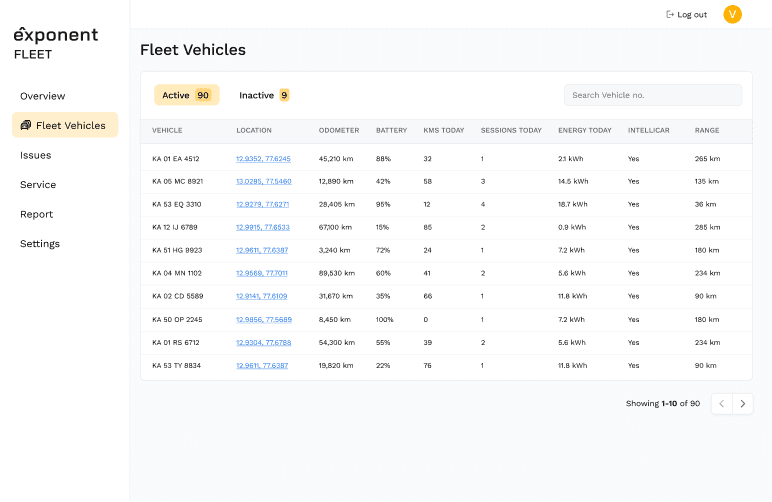
While the map is for "Right Now," the list view is for "Performance Auditing." I designed the Fleet Overview table to replace the manual Excel sheets managers were using.
The "Active vs. Inactive" Tabs
I separated the list into two tabs—Active (90) and Inactive (9). This forces managers to pay attention to the 9 vehicles that aren't making money.
Curated Data Columns
I removed engineering metrics (Voltage/Temp) and strictly included operational metrics:
Sessions Today & Energy Today: Validates that the vehicle is utilizing the rapid charging network.
Location: Clickable lat/long links for verification.
IntelliCar Status: A specific column (Yes/No) to troubleshoot IoT connectivity issues transparently.
Range: The final column, providing the ultimate efficiency metric.

"Did this driver actually drive the route?"
A major friction point was trust. New partners often doubted the route efficiency. I designed a detailed Route Playback view that allows managers to audit past performance visually.
The Interaction Flow:
Select Date: A calendar picker allows users to jump back to specific dates (e.g., Nov 23).
Select Time: A secondary dropdown refines the playback window.
Visual Verification: The system draws the Route Polyline on the map, showing the exact path taken.
Route Stats: The bottom overlay summarizes the trip: 90km traveled in 8 hrs.
This feature killed the need for manual route validation reports.
Design Engineering
We were a lean team. To ensure these complex data tables and map interactions were feasible, I didn't just design in Figma—I built the frontend foundation.
Using Cursor (AI), I prototyped the dashboard in React/Tailwind. This allowed me to:
Test Real Data: I verified that the "Inactive (>2 Days)" filter logic actually worked with real fleet data sets.
Responsive Logic: I ensured the sidebar and map interactions (like the "View Details" popover) worked seamlessly on mobile web, which was crucial for managers in the field.

Impact
The success of this redesign wasn't just about cleaner UI. It was about retiring the "Weekly PowerPoint."
By embedding critical metrics like Sessions Today, Energy Throughput, and Inactive Alerts directly into the interface, we turned a passive viewing tool into an active management OS. Fleet managers no longer ask "Is the technology working?"—they log in, check the Green Dots, and get back to business.
Reflection
The success of this redesign wasn't just about cleaner UI. It was about retiring the "Weekly PPT." By embedding critical metrics like Sessions Today, Energy Throughput, and Inactive Alerts directly into the interface, we turned a passive viewing tool into an active management OS.
Fleet managers no longer ask "Is the technology working?" They ask "How can I optimize my fleet?"—and the dashboard gives them the answer.